
 X
X
 facebook
 WhatsApp
 Email
Email

Introduction
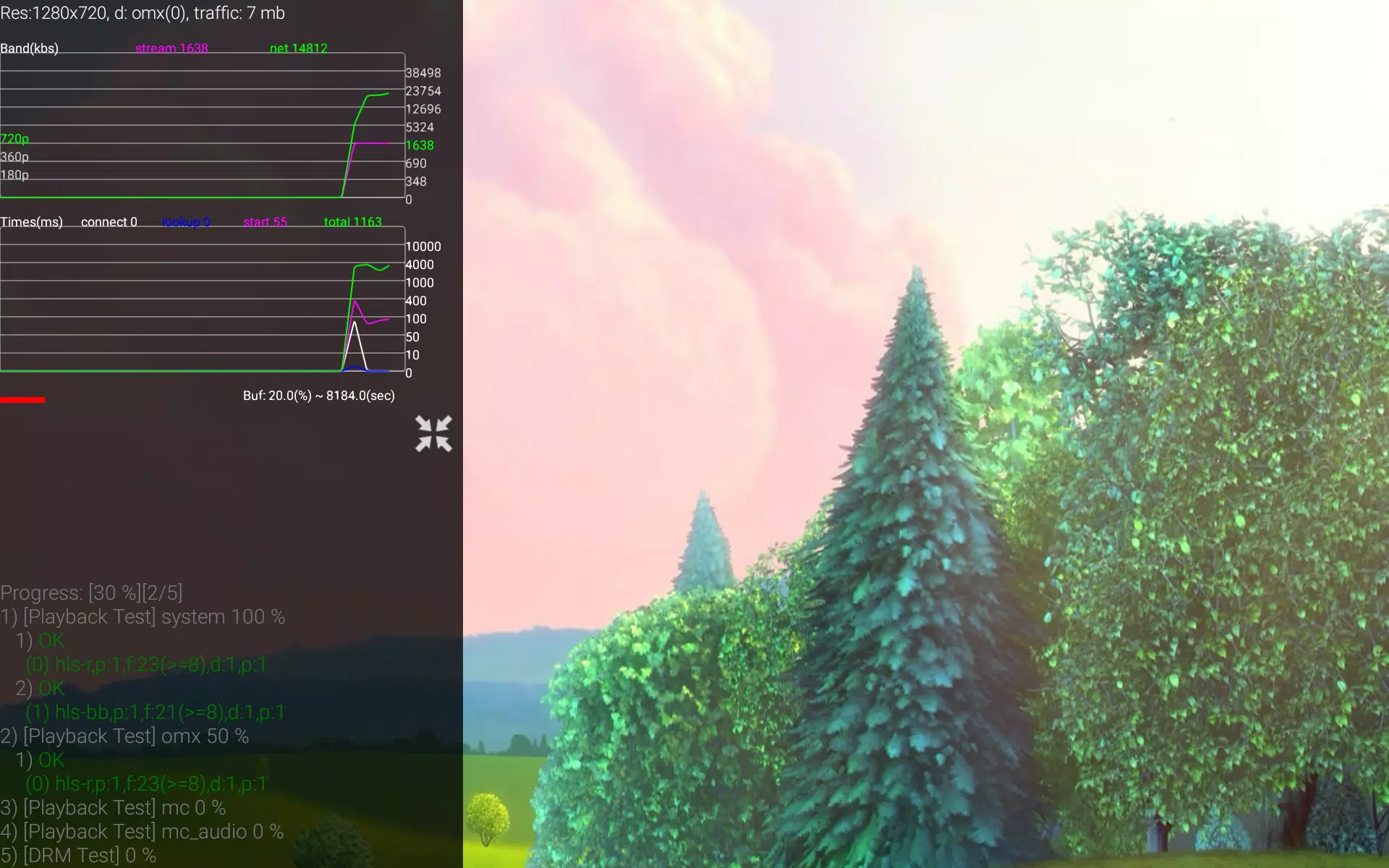
SPB TV Multimedia Test is a compact diagnostic utility that evaluates how an Android device handles a range of video playback and streaming scenarios. SPB TV Multimedia Test runs adaptive stream simulations, measures playback performance across multiple bitrates, and probes decoder support so developers and advanced users can pinpoint compatibility limits and playback issues. The app focuses on clear, actionable feedback rather than consumer playback features, making it useful when you need to verify smooth playback under varying network conditions or compare decoder behavior on particular hardware.
Key features
The tool performs adaptive stream tests that emulate real-world network fluctuations and observe how a player switches between qualities. It executes bitrate variation checks to reveal how playback stability changes from low to high bandwidth, and it runs decoder compatibility probes to enumerate supported codecs and hardware decoders. Playback behavior reporting highlights buffering events, dropped frames and stutter, producing time-stamped indicators that make it easier to correlate problems with specific test conditions. These features are presented in a way intended to be useful for troubleshooting and for informing codec and configuration choices during app or service development.
How the tests work
Tests are arranged as repeatable routines that run a sequence of controlled playback scenarios. Each routine can include segments of different bitrates and resolutions so you can observe decoder switching and buffer handling. Network behavior is simulated by varying throughput and latency parameters during adaptive stream runs; where a live network is available the app can run tests using real streaming endpoints to show behavior under current conditions. Decoder detection inspects available software and hardware decoders, and the tests report how each decoder performs when subjected to increasing bitrate and complexity.
Controls and user interface
The interface prioritizes clarity: a dashboard shows current test status, instantaneous playback metrics and a summary timeline of events such as buffer fills, re-buffering occurrences and frame drops. Controls are straightforward for users familiar with diagnostic tools — start, pause and stop controls for test sequences, options to repeat a test run, and the ability to adjust parameters such as target bitrate ranges and simulated network profiles. Log entries and visual indicators are designed to be readable at a glance, with more detailed timing and statistics available for deeper inspection.
Test modes and progression
SPB TV Multimedia Test supports structured test progression so you can validate device behavior incrementally. You can run a quick smoke test to confirm basic playback and decoder availability, a medium-duration session to evaluate adaptive switching under fluctuating bandwidth, or an extended stress sequence that cycles through multiple bitrates and resolutions. Tests can be repeated to measure regression over time, and the predictable progression allows QA teams to reproduce conditions reliably across devices.
Reports, logs and interpreting results
The app provides human-readable summaries of each test run and a detailed event log that timestamps buffering, quality switches and frame drop events. These outputs are intended to help you identify whether an issue is caused by network conditions, decoder limitations or buffer management. Advanced users will find the timing data helpful for correlating playback anomalies with specific codec behavior or hardware constraints. The emphasis is on concrete signals — continuity metrics, adaptive response, and decoder-specific notes — rather than ambiguous scores.
Customization and configuration
Configuration options let you tailor tests to the device or service under examination: choose target bitrate ranges, enable or disable specific decoder checks, adjust buffer thresholds and select network profiles to emulate different mobile or Wi‑Fi conditions. These settings help developers focus on the most relevant parameters for their use case and reduce time spent on irrelevant checks. The app’s presets can also be used as starting points for custom test scenarios.
Accessibility, offline use and replay value
SPB TV Multimedia Test is designed to be accessible to technically oriented users: the UI supports scalable text sizes and clear contrast for readability, and logs are presented in straightforward formats that work with common accessibility tools. Where local sample files are available or provided by the user, the app can run playback checks without an active network connection to validate decoder and rendering behavior offline. Because playback performance can vary with network and system load, repeated runs are valuable for regression testing and for verifying fixes, giving the tool ongoing utility in development and QA workflows.
Who benefits from using it
Developers building media apps, QA engineers validating streaming services and advanced users troubleshooting playback problems will find SPB TV Multimedia Test helpful for identifying decoder compatibility, buffering behavior and adaptive stream responsiveness. The app is a practical diagnostic companion when preparing apps or services for a range of devices and network environments, enabling informed decisions about codec selection and streaming configuration.
Information
This collection of TV apps offers users several options for free streaming, featuring high-definition media players compatible with television. With these apps, you can easily watch your favorite shows without hassle. The platform boasts a vast library of video content, organized into clear categories for quick access. High-quality videos are just a click away, ensuring you never miss out on anything. If you're interested, download and start enjoying the experience today!






What would it be like to download video software for free? In this collection, you can find various video software that interests you, whether it’s video players or video editors—everything you need is here. All of it is provided for free, allowing you to download with ease and without any worries.




User Comments
OM Manager is a mobile utility designed to simplify on-site configuration of WISI OM10 micro headend hardware from Android phones and tablets. OM Manager connects to supported OM10 devices over Bluetooth so technicians can discover units, review current settings and make adjustments to network parameters, user accounts and saved configurations without a PC. The app focuses on efficient, repeatable workflows for installation and routine maintenance, helping teams keep multiple headends consistent while reducing time spent traveling to a central workstation.

MAMUSDA 2019 is a mobile application designed to catalog and manage information about mosques and prayer halls as part of a Community Service Program (KKN) themed Berdaya. The app helps users find nearby mosques, view contact details, prayer schedules, available facilities, and historical background, making it easier to connect with local religious spaces. Users may want MAMUSDA 2019 for its centralized directory, interactive maps, and simple administrator tools that keep mosque profiles current—useful for community members, program coordinators, and anyone seeking reliable worship-place information.

moviedplays Madden NFL 17 is a free mobile app that delivers curated HD video tutorials and play breakdowns for players seeking to improve their Madden NFL 17 performance. The app installs a library of high-definition videos focused on plays, formations and in-game decision-making, presented through a simple, smartphone-friendly interface. Users will appreciate clear visual demonstrations that make advanced strategies easy to follow, whether they are casual players or competitive ones. By providing step-by-step walkthroughs and professional techniques, moviedplays Madden NFL 17 helps users learn faster and gain confidence while playing the football simulation on their device.

expo NAVIGATION is a native event navigation app built to make trade fairs and conferences easier to navigate, whether you are moving between halls, across outdoor exhibition areas or up and down multiple floors. expo NAVIGATION places schedules, interactive maps and exhibitor details in one consistent interface so attendees can find sessions, bookmark booths and capture contact information without juggling paper plans or separate websites. The design emphasizes clear, multi-level routing and simple controls so visitors and staff get accurate guidance in busy on-site conditions.

iPalika is an Android application that connects citizens with their local municipal office, providing a single place to receive notices, view upcoming programs, access important documents and contact officials. The app streamlines everyday interactions by offering one-click complaint submission, emergency contact details, and bilingual support in Nepali and English, so residents can report issues and stay informed quickly. Municipal staff use iPalika's employee login and dashboard to manage tasks, collect community data and push timely announcements. For anyone who wants easier access to local services and clearer communication with local government, iPalika simplifies and digitizes those routines.

kubenav - Kubernetes Dashboard is a cross-platform application for mobile and desktop that brings cluster operations into one consistent, readable interface so engineers can inspect, troubleshoot and act without switching tools. The app places core cluster concepts — clusters, namespaces, workloads and pods — into a single view and surfaces logs, events, resource YAML and an integrated remote shell so you can identify issues, apply fixes and scale resources directly from your phone or laptop.