
 X
X
 facebook
 WhatsApp
 Email
Email
Introduction
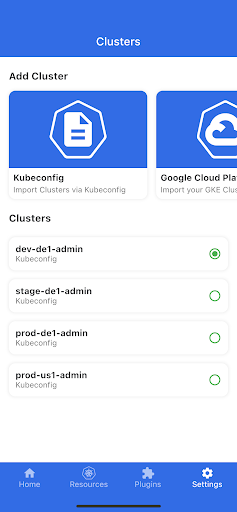
kubenav - Kubernetes Dashboard is a cross-platform application for mobile and desktop that brings cluster operations into one consistent, readable interface so engineers can inspect, troubleshoot and act without switching tools. The app places core cluster concepts — clusters, namespaces, workloads and pods — into a single view and surfaces logs, events, resource YAML and an integrated remote shell so you can identify issues, apply fixes and scale resources directly from your phone or laptop.
Overview and core functionality
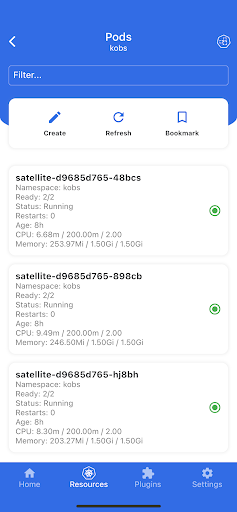
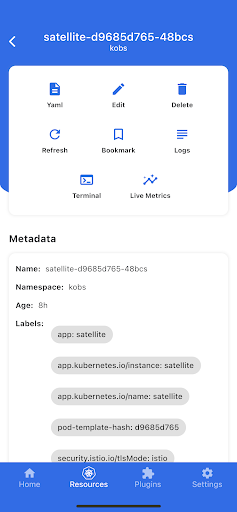
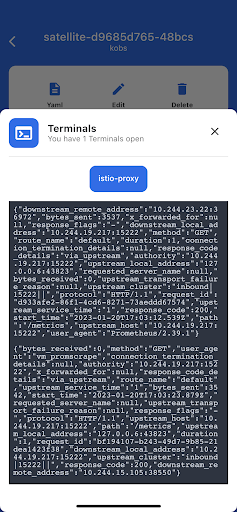
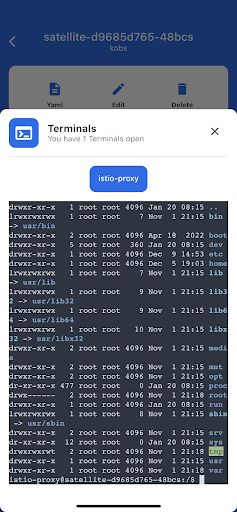
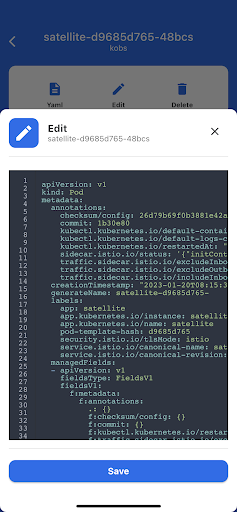
The core of kubenav - Kubernetes Dashboard is a unified cluster explorer that shows Deployments, StatefulSets, DaemonSets, Pods and Custom Resource Definitions alongside status indicators and recently seen events. Resource pages provide contextual information: recent events and logs, runtime metadata, and actions to edit, scale or delete resources where your credentials permit. An embedded terminal allows opening a remote shell inside containers for hands-on troubleshooting, and built-in port-forwarding exposes Pod services locally so you can test web endpoints from a mobile browser or desktop without additional CLI commands.
Controls and user interaction
The interface adapts to input modality: on desktop you interact with mouse and keyboard for fast navigation, filtering and editing, while on mobile the layout and touch targets are optimized for taps and simple gestures. Search and filter controls let you quickly locate resources by name, label or field values, and resource pages provide copyable YAML and logs for fast sharing. On desktop, common actions are designed to be reachable via keyboard-friendly flows; on mobile, actions are grouped to reduce navigation depth and allow quick incident response with minimal taps.
Progression and workflow
Users typically progress from discovery to action: start with a cluster overview to detect unhealthy workloads, drill into namespace and workload pages for details, stream logs to identify errors, and then use the terminal or edit function to patch configuration or scale replicas. This stepwise workflow supports both occasional maintenance tasks and time-sensitive incident response. kubenav - Kubernetes Dashboard helps flatten the learning curve by keeping resource context visible while you act, so less-experienced operators can follow the same steps used by senior engineers.
Resource structure and level design
The app mirrors Kubernetes’ object hierarchy so you can move naturally from cluster-level views to namespaces, then to workloads and individual pods. Each level provides status badges and summaries to surface key indicators (for example, ready pod counts and restart counts) so you can prioritize which services need attention. Support for Custom Resource Definitions allows third-party controllers and operators to appear in the same navigation model alongside built-in resources, making the app suitable for clusters with extended APIs.
Customization, metrics and observability
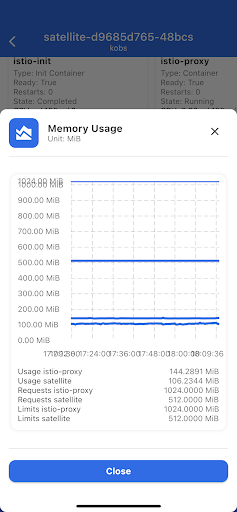
kubenav - Kubernetes Dashboard integrates with Prometheus to display metrics and create simple dashboards inside the app, letting you correlate resource state with performance trends. Port-forwarding simplifies local testing of services, and the combination of logs, events and metrics reduces the need to switch between multiple monitoring tools during an investigation. The app respects kubeconfig and cloud provider authentication methods, enabling multi-cluster management from a single interface while keeping credentials under your control.
User experience, accessibility and visual design
The visual design emphasizes readable lists and compact detail views so information density remains useful on smaller screens. Typography, contrast and spacing have been tuned for clarity during long troubleshooting sessions, and interactive elements are sized for accurate touch interaction on phones. The app aims to be efficient for frequent users—reducing context switches with consistent layout—and accessible to newcomers by presenting clear status indicators and event timelines rather than raw noise.
Replay value and daily use
Rather than being a one-off tool, kubenav - Kubernetes Dashboard is built for repeated operational use: routine scaling, quick edits, log reviews and port-forward tests are common daily tasks that benefit from a consistent mobile/desktop experience. The app becomes more valuable as you attach more clusters and use its integrated observability features to reduce time-to-resolution for incidents.
Limitations and requirements
The app requires valid cluster access credentials (kubeconfig or supported cloud provider account) and network access to the Kubernetes API; offline management is not supported. Operations are constrained by the permissions associated with your credentials, and any destructive actions (deletes, scale changes) take effect according to cluster RBAC and admission policies. For secure deployments, ensure your kubeconfig and credentials are managed according to your organization’s best practices.
Who should use it
kubenav - Kubernetes Dashboard is intended for developers, SREs and operators who need fast, consistent access to multiple clusters from mobile and desktop devices. If you handle incident response, routine maintenance or want a compact way to review resource state and metrics while on the move, this dashboard centralizes the necessary tools—logs, metrics, terminal and port-forwarding—into a single navigable experience that complements CLI and web-based tooling.
Information
 Google Play

The Remote App Tool collection includes many Android apps that allow remote control. With the growing number of smart devices, it's easy to misplace remotes. These apps solve that problem, offering a convenient, free way to control your devices. They provide great convenience for your daily life!





User Comments
OM Manager is a mobile utility designed to simplify on-site configuration of WISI OM10 micro headend hardware from Android phones and tablets. OM Manager connects to supported OM10 devices over Bluetooth so technicians can discover units, review current settings and make adjustments to network parameters, user accounts and saved configurations without a PC. The app focuses on efficient, repeatable workflows for installation and routine maintenance, helping teams keep multiple headends consistent while reducing time spent traveling to a central workstation.

MAMUSDA 2019 is a mobile application designed to catalog and manage information about mosques and prayer halls as part of a Community Service Program (KKN) themed Berdaya. The app helps users find nearby mosques, view contact details, prayer schedules, available facilities, and historical background, making it easier to connect with local religious spaces. Users may want MAMUSDA 2019 for its centralized directory, interactive maps, and simple administrator tools that keep mosque profiles current—useful for community members, program coordinators, and anyone seeking reliable worship-place information.

moviedplays Madden NFL 17 is a free mobile app that delivers curated HD video tutorials and play breakdowns for players seeking to improve their Madden NFL 17 performance. The app installs a library of high-definition videos focused on plays, formations and in-game decision-making, presented through a simple, smartphone-friendly interface. Users will appreciate clear visual demonstrations that make advanced strategies easy to follow, whether they are casual players or competitive ones. By providing step-by-step walkthroughs and professional techniques, moviedplays Madden NFL 17 helps users learn faster and gain confidence while playing the football simulation on their device.

expo NAVIGATION is a native event navigation app built to make trade fairs and conferences easier to navigate, whether you are moving between halls, across outdoor exhibition areas or up and down multiple floors. expo NAVIGATION places schedules, interactive maps and exhibitor details in one consistent interface so attendees can find sessions, bookmark booths and capture contact information without juggling paper plans or separate websites. The design emphasizes clear, multi-level routing and simple controls so visitors and staff get accurate guidance in busy on-site conditions.

iPalika is an Android application that connects citizens with their local municipal office, providing a single place to receive notices, view upcoming programs, access important documents and contact officials. The app streamlines everyday interactions by offering one-click complaint submission, emergency contact details, and bilingual support in Nepali and English, so residents can report issues and stay informed quickly. Municipal staff use iPalika's employee login and dashboard to manage tasks, collect community data and push timely announcements. For anyone who wants easier access to local services and clearer communication with local government, iPalika simplifies and digitizes those routines.

kubenav - Kubernetes Dashboard is a cross-platform application for mobile and desktop that brings cluster operations into one consistent, readable interface so engineers can inspect, troubleshoot and act without switching tools. The app places core cluster concepts — clusters, namespaces, workloads and pods — into a single view and surfaces logs, events, resource YAML and an integrated remote shell so you can identify issues, apply fixes and scale resources directly from your phone or laptop.